The command center (desktop)
Filter, compare and drill into every Alzheimer's drug with the interactive command center on alzheimers.ephemerisx.com.
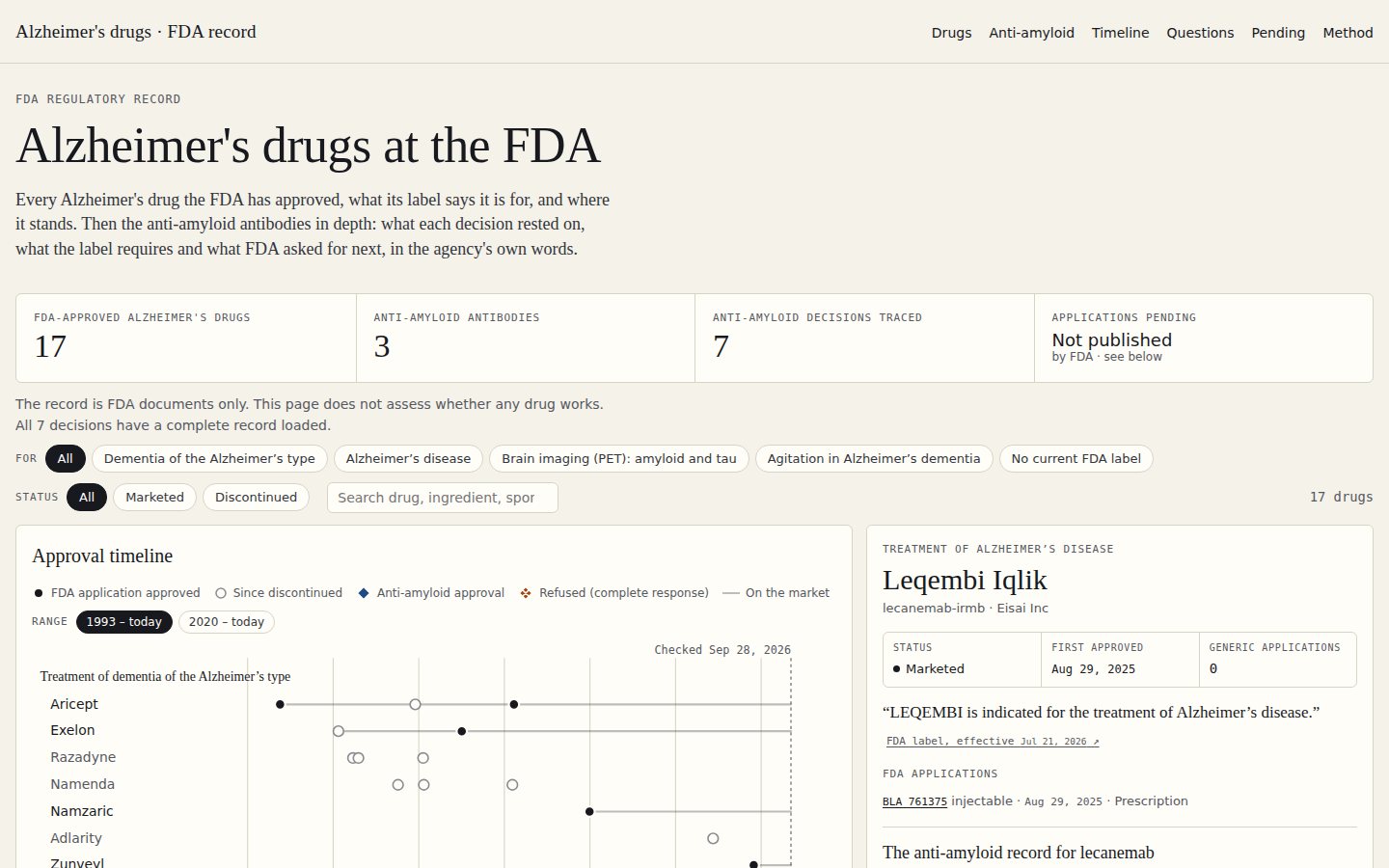
On a desktop screen at least 1,100 pixels wide, the home page shows an interactive command center in place of the drug table, the in-depth cards and the Pending section. It holds the same information, arranged so you can filter and compare.
 1
2
3
4
5
6
1
2
3
4
5
6
- 1For filter chips.
- 2Status chips and the search box.
- 3Live count of matching drugs.
- 4Approval timeline, one row per drug.
- 5Range buttons for the timeline.
- 6Side panel with the selected drug's record.
Filter the drugs#
- For: All, Brain imaging (PET): amyloid and tau, Agitation in Alzheimer's dementia, Alzheimer's disease, Dementia of the Alzheimer's type, or No current FDA label.
- Status: All, Marketed or Discontinued.
- Search: type a brand, ingredient or sponsor in Search drug, ingredient, sponsor.
The count on the right updates, for example Showing 4 of 17 drugs. Drugs that do not match are faded rather than removed, so the timeline keeps its shape.
Approval timeline#
One row per drug, grouped by use, on a timeline of years. A dashed line marks the date last checked.
| Mark | Means |
|---|---|
| ● Filled dot | FDA application approved |
| ○ Hollow dot | Since discontinued |
| ◆ Blue diamond | Anti-amyloid approval |
| Orange diamond with an X | Refused (complete response) |
| — Grey bar | On the market |
- Range: choose 1993 – today for the whole history or 2020 – today to spread out the antibody era.
- Hover (or keyboard-focus) a mark to see its application or decision, date and status.
- Select a row (click, or Enter / Space) to open that drug in the side panel.
- Table view shows the full drug table and scrolls to it.
Side panel#
Shows the selected drug: its use, name, ingredient and sponsor; Status, First approved and Generic applications; the label's indication with its link; and its FDA applications. For an anti-amyloid antibody it adds the drug's full record: products, decisions and Latest decision, in full →.
When the page first loads, the panel shows the drug with the most recent decision.
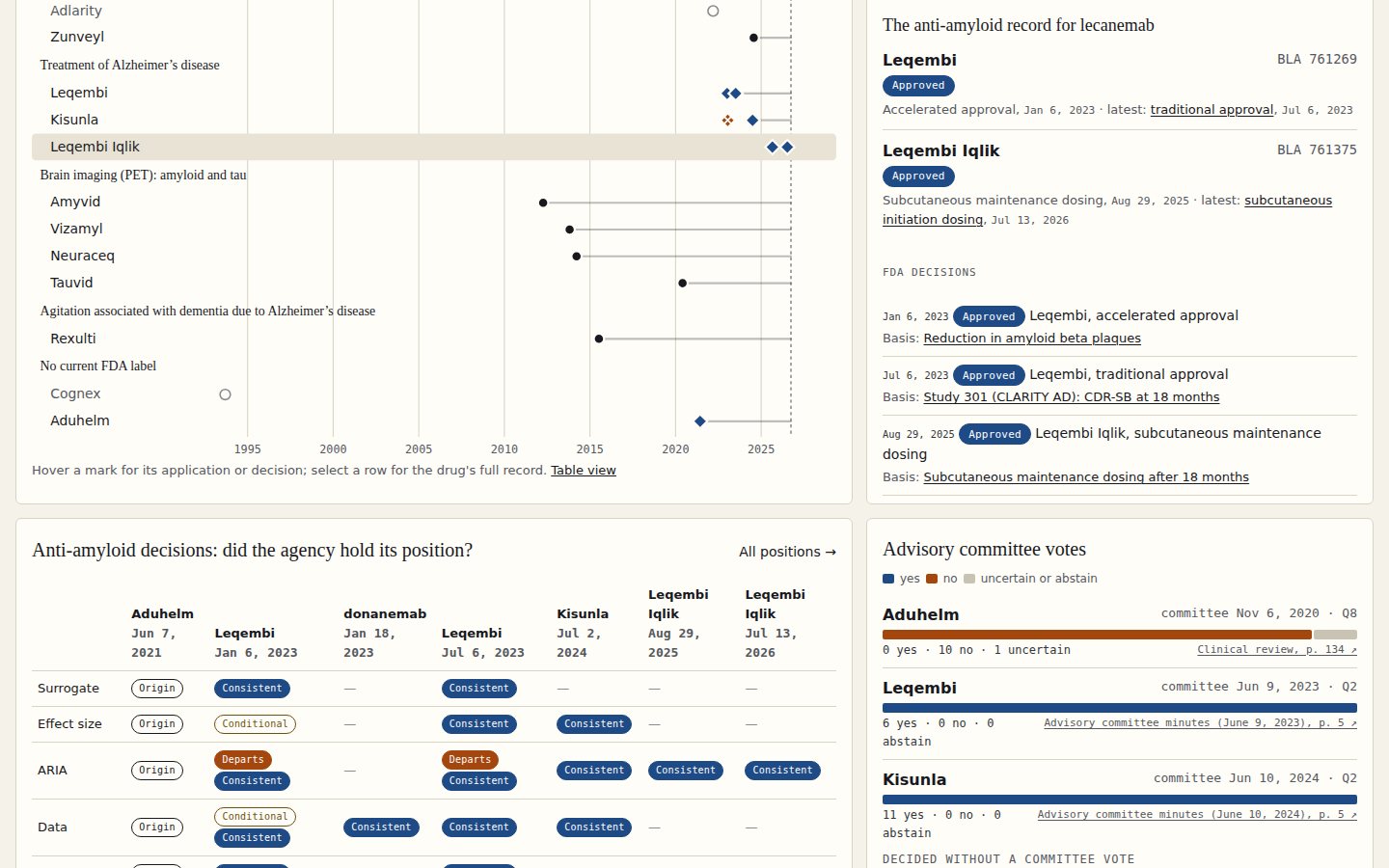
Anti-amyloid decisions: did the agency hold its position?#
A grid with the five threads down the side and every decision across the top. Each cell shows a status pill for each position the agency took on that thread in that decision; hover a pill for its thread and decision, and select it to read the position. A dash means no position is recorded. Select All positions → for the threads page.
Advisory committee votes#
One stacked bar per decision that went to an advisory committee, labelled with the committee date and question number. Blue is yes, orange is no, beige is uncertain or abstain. Each bar shows the counts and cites the minutes or review it comes from; hover a segment for its count. Decisions made without a vote are listed underneath as not referred or none mentioned in the letter.
Pending applications#
A short card: “Not published by FDA.” It shows the latest committee meeting notice and when the sources were last checked. What the record watches → opens the full Pending section.