Build queue replay
Read and control the build queue panel, which replays the documents waiting to be read at real pipeline speed.
The build queue panel, at the bottom left of the map, shows the documents that are in the system but not yet in the graph. It replays them page by page at the speed the pipeline actually reads, so you can see what the map will look like once the queue is built.
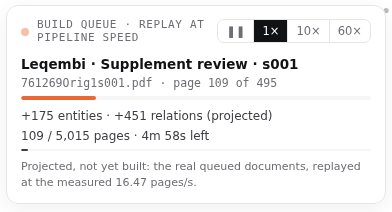
Read the panel#
| Part | What it shows |
|---|---|
| Build queue · replay at pipeline speed | The title. The dot next to it pulses while the replay plays. |
| Current document | The drug and document being replayed, for example Leqembi · Supplement review · s001, with the file name and page N of N. |
| Progress bars | The upper bar, in the drug's colour, tracks the current document. The thin lower bar tracks the whole queue. |
| Counters | +N entities · +N relations (projected) so far, and N / N pages · time left for the whole queue. |
| Footer | The measured reading speed, in pages per second. Hover it for how the speed was measured. |
While the replay plays, the document being read is highlighted in the list's document lists, and its translucent dots appear on the map.
Control the speed#
| Button | Does |
|---|---|
| ❚❚ | Pause. |
| 1× | Real pipeline speed. The default. |
| 10× | Ten times faster. |
| 60× | Sixty times faster: a queue of several minutes plays in seconds. |
When the whole queue has played, the panel reads “Queue replayed: every document in the system” and “The projected graph once the queue is built. Restarting…”, then fades and starts again.
When the panel is hidden#
- When nothing is queued (for example on the SEC map today), there is nothing to replay and the panel does not appear.
- If your device is set to reduce motion, the replay starts paused on ❚❚. Select 1× to play it.