Tutorial: Check where a drug stands on the map
Find a drug on the Ephemeris, read its status, open its documents and follow it to its FDA decisions.
In this tutorial you find Leqembi on the FDA Ephemeris, see how much of its record has been read, and follow it to its FDA decisions. It takes about five minutes.
Step 1: Open the FDA map#
- Go to ephemerisx.com/ephemeris/fda/.
- Look at the stats strip at the top. The gap between Built from and In the system is what is still queued.
Step 2: Find the drug#
- Type
leqembiin Search drugs, cases, documents…. The list narrows to matching rows, and matching items are ringed on the map. - Read the status chip on the row, for example ○ Queued.
Step 3: Open the row#
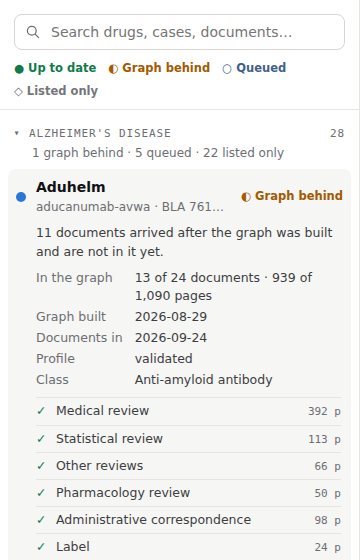
- Select the Leqembi row. The map flies to its cluster.
- Read the explanation at the top of the row: it says why the item has its status.
- Scan the document list: ✓ means in the graph, ○ means waiting.
Step 4: Watch the queue#
- Look at the build queue panel at the bottom left. If Leqembi's documents are queued, the replay shows them being read.
- Select 60× to speed it up. Translucent dots gather in Leqembi's cluster: a projection of what the graph will hold.
Step 5: Open the drug's page#
- Go to /ephemeris/fda/leqembi/. The map opens zoomed onto Leqembi, with its information card at the top of the list.
- Under FDA decisions, select a decision to read it on the Alzheimer's record.
Next steps#
- Change Group by to Document type to compare Leqembi's documents with other drugs'.
- Select Fit the whole map to zoom back out.