The Ephemeris overview
The Ephemeris is EphemerisX's interactive progress map. Learn what it shows and the parts of the screen.
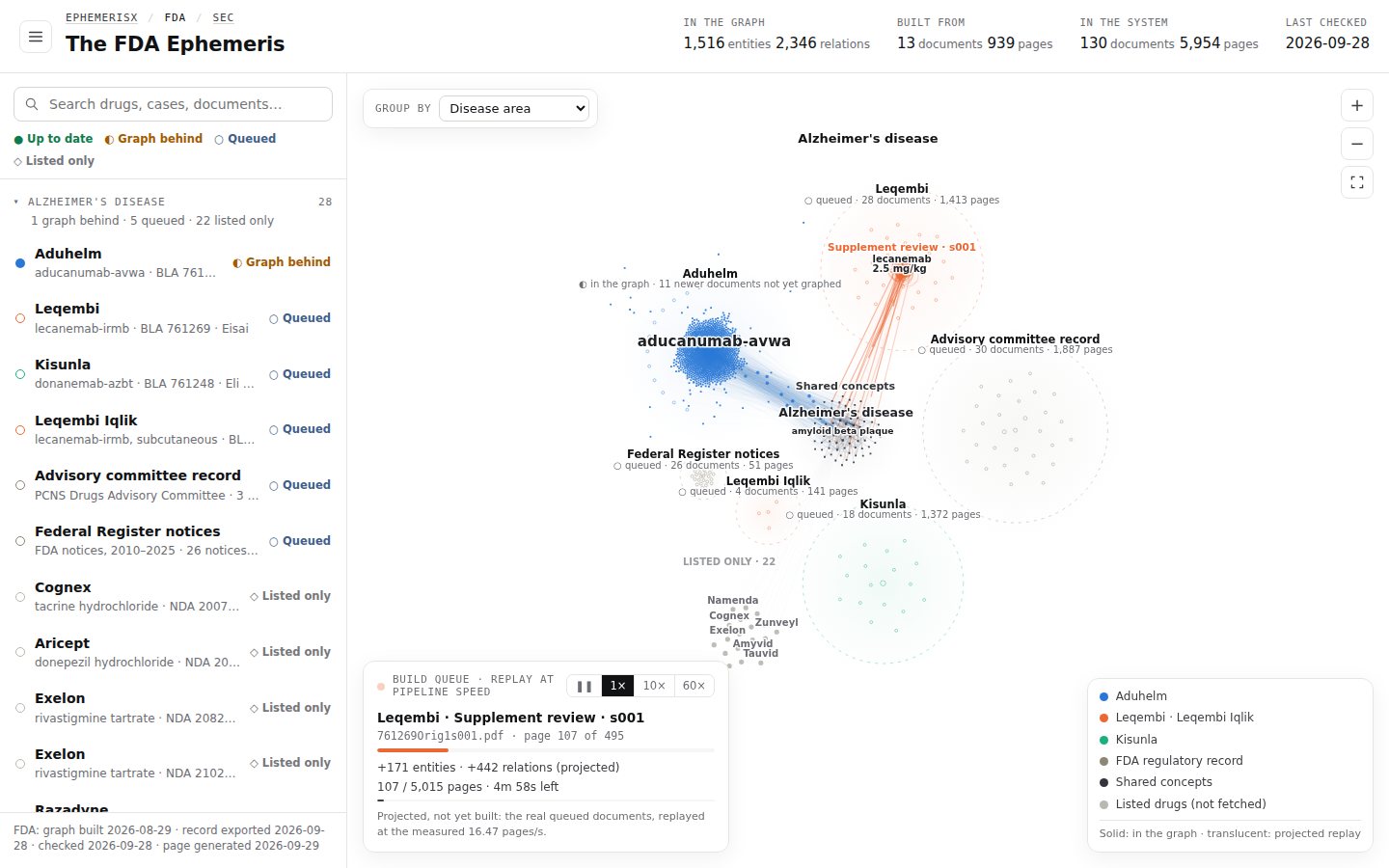
The Ephemeris charts every public record EphemerisX reads as a single map. Each drug programme (or, on the SEC map, each company) is a cluster of dots. The map shows what is in the system, how much of it has been read, and what is still waiting in the queue.
Open it at ephemerisx.com/ephemeris/.
What the map shows#
- Dots are entities: named things found in the documents, such as a trial, an endpoint, a dose, an adverse event, an organisation or a regulatory concept. Bigger dots are mentioned more often.
- Lines are relations between two entities.
- Clusters are items: one drug programme, FDA record or company. Its dots take the item's colour.
- Shared concepts sit in the middle: one dot for a concept every drug refers to (for example Alzheimer's disease or amyloid beta plaque), linked to each drug that mentions it.
Solid dots are in the built graph. Translucent dots are a projection of what queued documents will add once they are read. See Status and legend reference.
Parts of the screen#
 1
2
3
4
5
6
7
8
9
10
11
12
1
2
3
4
5
6
7
8
9
10
11
12
- 1List button. Shows or hides the list on the left.
- 2Breadcrumb. EphemerisX / FDA / SEC. Switches between the overview and the two maps.
- 3Stats strip. In the graph (entities and relations), Built from (documents and pages read), In the system (documents and pages held) and Last checked.
- 4Search box. Filters the list and highlights matches on the map. See Search.
- 5Status key. ● Up to date, ◐ Graph behind, ○ Queued, ◇ Listed only.
- 6The list. The same items as the map, as text, in groups. Open a row for its documents.
- 7Group by. Rearranges the map by disease area, drug class, sponsor and more. See Group the map.
- 8Zoom controls. Zoom in, zoom out, and Fit the whole map.
- 9The map. Drag to pan, scroll to zoom, hover for details, click to select. See Navigate the map.
- 10Build queue replay. Replays the queued documents at pipeline speed. See Build queue replay.
- 11Legend. What each colour stands for.
- 12Data dates. When the graph was built, the record exported, the sources checked and the page generated.
The three views#
| View | Address | Shows |
|---|---|---|
| Overview | /ephemeris/ | Every corpus EphemerisX reads, on one map, with The FDA Ephemeris and The SEC Ephemeris as large titles. |
| The FDA Ephemeris | /ephemeris/fda/ | FDA drug approvals, charted as they are read. Now charting Alzheimer's disease. |
| The SEC Ephemeris | /ephemeris/sec/ | Companies after an FDA Complete Response Letter: their letters, 8-K and 10-K filings. |
See The FDA and SEC maps for what each one covers.
Drug and company pages#
Each drug and company has its own address, such as /ephemeris/fda/leqembi/. It opens the same map zoomed onto that item, with an information card at the top of the list. See Drug and company pages.